
Download Ciné Box pour Freebox – Multimedia, Video, Freebox Player, Android, Free, Secure
Overview
Ciné Box pour Freebox is a multimedia application tailored for Android users who own or interact with Freebox devices. Designed to enhance the media experience, the app enables users to browse, retrieve, and launch movies and TV series stored on their Freebox Player, local network storage (NAS), or shared folders from another Freebox user. The application operates through third-party media players such as Videolan, ensuring compatibility with established playback standards. It is developed by g33k prod and distributed at no cost, making it accessible to a broad audience of home media enthusiasts and Freebox users seeking a streamlined way to access their digital libraries.
The app is particularly useful for individuals who manage large collections of video content and wish to enjoy a centralized, visually rich interface. By leveraging data from themoviedb and parsing file names, Ciné Box automatically populates metadata such as posters, summaries, actor details, and filmographies. This eliminates the need for manual tagging and enhances the browsing experience. The app supports both movies and TV series, with features like episode history tracking and the ability to resume playback from the last watched point. It is especially suited for users with fiber optic or VDSL internet connections, as shared Freebox folder access relies on stable, high-speed network performance.
Key Features & Capabilities
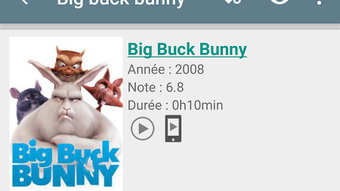
- Automatic Metadata Retrieval: Ciné Box automatically fetches movie and TV series details—including posters, plot summaries, cast information, and filmographies—from themoviedb using file names. This ensures a rich, visually engaging library without manual input.
- Multi-Source Content Access: Users can access media stored on their Freebox Player, NAS devices using DLNA or WebDAV protocols, or even from a friend’s shared Freebox folder, provided the network connection supports it.
- TV Series Management: The app maintains a history of previously watched episodes and allows users to resume playback seamlessly, improving continuity and convenience.
- Shake-to-Recommend Feature: A unique interactive function that suggests random movies when the device is shaken, adding an element of spontaneity to content discovery.
- Integration with External Players: The app requires the "Receiver for CinéBox" to be installed on the mini4k device to initiate playback, ensuring compatibility with media players like Videolan.
These capabilities make Ciné Box ideal for users managing digital video libraries across multiple devices. For instance, a user with a Freebox Player at home and a mobile device can browse their movie collection from anywhere, launch content via a compatible player, and resume watching later. The app’s reliance on file naming conventions means consistent organization is key to optimal performance.
User Interface, Workflow & Performance
Ciné Box pour Freebox presents a clean, user-friendly interface designed for efficient navigation through large media collections. The layout prioritizes visual elements such as movie posters and series thumbnails, enhancing discoverability. Users can browse by title, genre, or recently added content, with intuitive swipe gestures and search functionality. The workflow is streamlined: users select a title, and the app initiates playback via a connected external player after the "Receiver for CinéBox" is properly configured.
Performance details were not specified by the developer. However, based on general software behavior, the app operates efficiently on modern Android devices with stable network connectivity. The app’s reliance on network-based content retrieval means performance may vary depending on the speed and stability of the user’s connection. The developer did not specify resource usage details, such as CPU or RAM consumption. Stability is expected to be consistent under normal usage, but users with older Android devices may experience occasional delays during metadata loading or network discovery.
Compatibility & System Requirements
Ciné Box pour Freebox is designed for Android devices and is available through the Google Play Store. It is compatible with devices running the latest Android versions, though specific OS requirements were not listed. The application is intended to work with Freebox Player and mini4k devices, particularly those capable of supporting the "Receiver for CinéBox" component. Installation size is not specified, and exact system requirements were not provided.
Compatibility with NAS devices depends on their support for DLNA or WebDAV protocols. The app’s ability to access shared Freebox folders is contingent on a high-speed internet connection, such as fiber optic or VDSL, to ensure smooth data transfer. The developer did not specify hardware requirements for the Android device or the Freebox hardware. Users are advised to ensure their network setup supports the necessary protocols and bandwidth for optimal functionality.
Pros and Cons
Pros
- Free to use with no cost barrier to entry
- Automatically retrieves rich metadata from themoviedb
- Supports multiple content sources: Freebox Player, NAS, shared folders
- Intuitive UI with visual browsing and episode history tracking
- Unique shake-to-recommend feature for spontaneous movie discovery
Cons
- Requires installation of "Receiver for CinéBox" on mini4k device
- Dependent on stable network connection for remote and shared access
- Performance may vary on older or low-end Android devices
- File naming conventions must be consistent for accurate metadata retrieval
- Contains a small banner ad (removable via support option)
FAQ Section
Is Ciné Box pour Freebox compatible with all Freebox models?
The app is designed for Freebox Player and mini4k devices. Compatibility with other Freebox models is not confirmed and may depend on the device’s network and media capabilities.
Can I use Ciné Box without an internet connection?
While the app can access locally stored media, metadata retrieval from themoviedb requires an active internet connection. Offline browsing is possible but limited to basic file listings.
Is the app safe to download and use?
Ciné Box pour Freebox is available on the Google Play Store and is developed by g33k prod. It includes a small banner ad, but no malicious components have been reported. Users are advised to download only from official sources.
How do I install the Receiver for Ciné Box?
The "Receiver for CinéBox" must be installed on the mini4k device. Instructions are typically provided within the app or on the developer’s official page.
Does Ciné Box require a subscription or payment?
The app is free to use. A small banner ad is present, but users can support the developers by removing the ad through an in-app option.
Final Thoughts + CTA
Ciné Box pour Freebox delivers a powerful, free solution for users seeking to organize and enjoy their video content across multiple devices. Its ability to automatically fetch detailed metadata, support diverse content sources, and offer intuitive navigation makes it a standout tool for Freebox owners. While it requires a stable network and additional setup steps, the benefits far outweigh the minor setup effort. The app is particularly valuable for media enthusiasts who value convenience, visual appeal, and seamless playback integration.
For those using Freebox devices and managing digital video libraries, Ciné Box offers a comprehensive and user-friendly experience. It enhances the functionality of existing hardware without additional cost. Download Ciné Box now to elevate your media experience on Android.





.png)

